---
title: Hexo NexT 主题不蒜子相关问题汇总
tags:
- 博客
- Hexo
- Next
categories:
- [Blog, Hexo, Next]
abbrlink: e96c9b26
date: 2020-11-27 11:15:21
---
# 什么是不蒜子
[不蒜子](https://busuanzi.ibruce.info/)是 [Bruce](http://ibruce.info/) 开发的一款轻量级的网页计数器,可以将网站访问计数直接显示在网页上。
# 启用不蒜子
NexT 预置了不蒜子提供的网页计数功能。只需要在配置文件中启用即可。
``` yaml next/_config.yml
# Show Views / Visitors of the website / page with busuanzi.
# Get more information on http://ibruce.info/2015/04/04/busuanzi
busuanzi_count:
enable: true # 启用不蒜子
total_visitors: true # 网站总访客数
total_visitors_icon: fa fa-user
total_views: true # 网站总浏览数
total_views_icon: fa fa-eye
post_views: true # 文章浏览数
post_views_icon: fa fa-eye
```
# 不蒜子和 Live2D 冲突的问题
> Hexo 版本:5.2.0
> NexT 版本:8.0.2
> 不蒜子版本: 2.3
## 问题描述
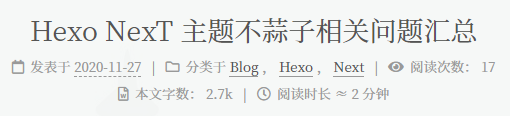
添加 Live2D 前的不蒜子显示情况如下。
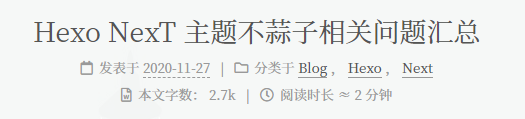
添加 Live2D 后,不蒜子在页面中不显示。
## 问题原因
经查,添加 Live2D 后网页的不蒜子部分源码的 `style` 从 `"display: inline;"` 替换为了 `"display: none;"`。
``` html 不蒜子不正常显示的网页源码
阅读次数:
19
```
``` html 不蒜子正常显示的网页源码
阅读次数:
18
```
## 解决方法
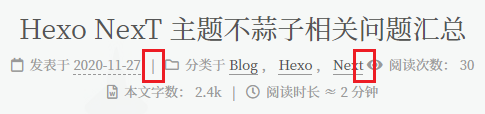
在网页生成引擎中修改代码,去掉不蒜子部分的 `id` 和 `style` 属性,重新生成网页即可解决该问题。若将 `class` 属性一并删除,会导不蒜子部分和前面的其他显示部分缺少分隔符,如下图。
具体需要修改两个文件,`next/layout/_third-party/statistics/busuanzi-counter.swig` 中修改的是网页页脚部分的不蒜子显示,`next/layout/_macro/post.swig` 中修改的博客文章阅览数的不蒜子显示。
``` html next/layout/_third-party/statistics/busuanzi-counter.swig
{%- if theme.busuanzi_count.total_visitors %}
{%- endif %}
{%- if theme.busuanzi_count.total_views %}
{%- endif %}
```
``` html next/layout/_macro/post.swig
{%- if not is_index and theme.busuanzi_count.enable and theme.busuanzi_count.post_views %}
{%- endif %}
```